This page is migrated from a public Academy4Tech project record and reorganized for clarity. Unverified build values have not been invented.
Documented hardware
- Logitech F710 or compatible joystick
- Linux computer
Documented software
- Ubuntu/Linux
- ROS
- Python 3.6 or later
- pip
- Kivy
- KivyMD
- ROS joystick driver
Project overview
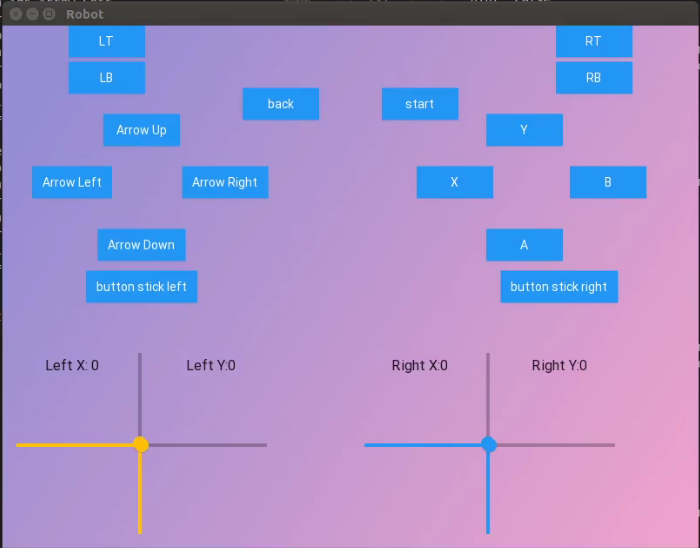
This project demonstrates joystick control through a custom graphical interface. A ROS node subscribes to sensor_msgs/Joy, reads axis and button values, and updates a KivyMD screen so the operator can see the controller state.
The original work credits Mr. Anouar Dhouibi for assistance with GUI and joystick-data transfer through ROS communication.
Documented setup sequence
- Prepare an Ubuntu or Linux environment.
- Install ROS.
- Install Python 3 and
pip(the legacy build used Python 3.6 or newer). - Install Kivy and KivyMD.
- Install the joystick driver and ROS joystick node.
- Map the controller to the publisher.
- Verify the nodes and topic data before running the interface.
ROS callback pattern
The application subscribes to /joy, then separates button and axis arrays inside its callback.
import rospy
from sensor_msgs.msg import Joy

def callback(data):
    buttons = data.buttons
    axes = data.axes
    print(*buttons)
    print(*axes)

rospy.Subscriber('/joy', Joy, callback)
The interface maps axis values to horizontal and vertical controls and changes button colors to reflect pressed states.
The repository targets a legacy ROS/Python environment. Confirm package versions and update deprecated dependencies before using it on a current system.
Source
See the Logitech F710 project repository for the original implementation.